How to Find an Image's Real File Type and What It Gives Away
A picture will not open, a website rejects an upload, or a photo is about to go to someone you
do not know. Two questions come up: what kind of file is this really, and what else is inside it?
The extension answers neither. .jpg is only part of the name, and anyone or anything can
change it. A phone that saves HEIC, a download that is really a WebP, or a "photo" that is a ZIP
archive all look the same in a folder.
The file itself always tells the truth. Every image format starts with a few fixed bytes, and
most photos carry far more than the picture: the camera, the time, often the exact place, and
sometimes things the sender never meant to share.
Checked on Windows 10 Pro 22H2 in November 2026.
The Real Type Is in the First Bytes
Each format begins with a signature, sometimes called a magic number. Programs that open
images look at these bytes, not at the name:
- FF D8 FF - JPEG
- 89 50 4E 47 0D 0A 1A 0A - PNG (the letters PNG, with bytes that catch damaged
transfers)
- GIF87a or GIF89a - GIF
- BM - Windows bitmap
- II* or MM* - TIFF, and most camera raw files, which are built on TIFF
- RIFF, four bytes, then WEBP - WebP
- ftyp at offset 4, followed by heic, avif or mif1 - HEIC, AVIF
and other HEIF images
- 00 00 01 00 - Windows icon
- 8BPS - Photoshop
Some files that are not images show up with picture names too: %PDF is a PDF,
PK is a ZIP archive (as are modern Word and Excel files), and MZ is a Windows program.
That last one, named photo.jpg.exe or simply photo.jpg, is a classic trick.
Check It With PowerShell
Format-Hex is built into Windows PowerShell 5.1, which every copy of Windows 10 and 11 has. This
prints the first 16 bytes of the file, as hex and as text:
Format-Hex -Path C:\Pictures\photo.jpg | Select-Object -First 1
Compare the start of the line with the list above. A file called photo.png that starts
FF D8 FF is a JPEG with the wrong name; most viewers will still open it, but some upload
forms and older programs will not.
What a Photo Carries With It
Besides the picture, most image files hold metadata, in up to three overlapping
systems:
- Exif - written by the camera or phone: make, model, lens, exposure, the date and time,
which way up it was held, and on phones the GPS position, often to within a few
metres
- XMP - written by editing programs: the program used, ratings and keywords, and in some
files a history of every save and change
- IPTC - captions, credits, copyright and keywords, mostly from news and stock
photography
In Windows, right-click the file, choose Properties and open the Details tab to
see the common Exif fields, including latitude and longitude. It does not show everything, and it
shows nothing for formats Windows has no codec for.
Things That Give Away More Than You Think
- GPS location. A phone photo taken at home, sent as a file rather than through a
service that strips metadata, gives away the address.
- Serial numbers. Many cameras record the body serial number, and some the lens serial
number and the owner's name. They link every photo from that camera together.
- The embedded thumbnail. Exif usually holds a small preview. Some editors save a
cropped or edited picture without updating it, so the thumbnail can still show what was cut
out.
- Editing history. XMP history can list the programs used and when, and what was
done.
- Data after the end. A viewer stops reading at the image's end marker, and anything
after it is ignored. Phones put extra pictures there on purpose (depth maps, HDR gain maps,
the video of a motion photo), but it is also the oldest way to hide a ZIP file inside a
picture.
To remove the common fields, use Remove Properties and Personal Information at the bottom
of the Details tab and choose to create a copy. Then check the copy: it does not reach every kind
of metadata in every format.
Other Questions the File Can Answer
- JPEG quality. The quality setting is not stored, but it can be estimated closely from
the quantisation tables in the file, by comparing them with the standard tables they were
scaled from. A "high quality" download that comes out at about 60 has been re-saved along the
way.
- Lossy or lossless. JPEG, lossy WebP, HEIC and AVIF throw detail away; PNG, GIF,
lossless WebP and most TIFF files do not.
- Colour profile. An embedded ICC profile such as Display P3 or Adobe RGB
tells software how to show the colours. Without one, most software assumes sRGB.
- Damage. PNG checks every block with a CRC, and JPEG and GIF have end markers, so a
file cut short by a failed download or a bad disk can be spotted, and so can the exact place
it goes wrong.
Image Info
Image Info is our free
Windows tool that answers all of this in one window. Drop an image on it, or right-click one in
Explorer:
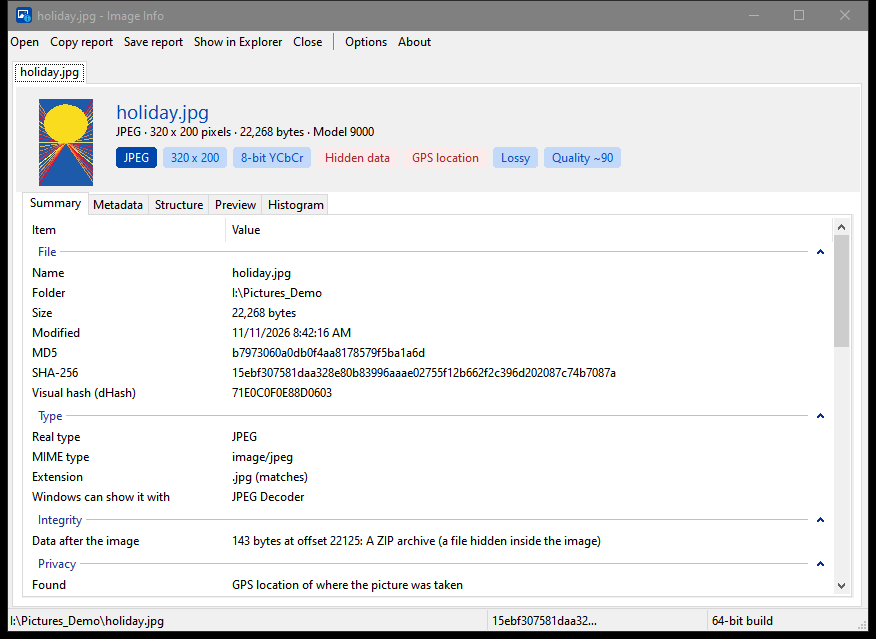
- The real type from the file's content, a warning when the extension is wrong, and what a
non-image really is (PDF, ZIP, program and so on)
- Size, bit depth, colour model, transparency and whether it is actually used, palette,
compression, chroma subsampling, the estimated JPEG quality, frames and animation timing, DPI
and print size
- Camera, lens and exposure, the GPS position with a map link, and every Exif, IPTC and XMP
field, plus the colour profile
- A Privacy section that lists GPS, serial numbers, owner names, editing history,
thumbnails that differ from the picture and hidden data
- Damage checks, data after the end of the image and what it is, and a map of every block in
the file with its offset and size
- A preview shown upright, the embedded camera preview for raw files, a histogram, MD5 and
SHA-256 hashes, and a visual hash that stays the same, or nearly, when a picture is re-saved
or resized
It reads JPEG, PNG and APNG, GIF, BMP, TIFF, WebP, ICO, HEIC, AVIF, JPEG XL, JPEG 2000,
Photoshop, SVG and the main camera raw formats (DNG, CR2, CR3, NEF, ARW, ORF, RW2 and RAF). The
details come from the file itself, so they are there even when Windows has no codec to show the
picture. A 64-bit and a 32-bit build are included, and the whole report can be copied or saved as
text.
Summary
- The extension is a label; the first bytes of the file say what it is.
- FF D8 FF is JPEG, 89 50 4E 47 is PNG, GIF8 is GIF, RIFF....WEBP
is WebP and ftyp at offset 4 is HEIC or AVIF.
- Photos can hold the GPS position, camera serial numbers, an out-of-date thumbnail, editing
history and data after the end of the picture.
- Check a file before sending it, and check a copy after removing its metadata.
Download Image Info
Useful References
If you found this useful, then please consider chipping in.
Chip In with 
 Please chip in if helpful
